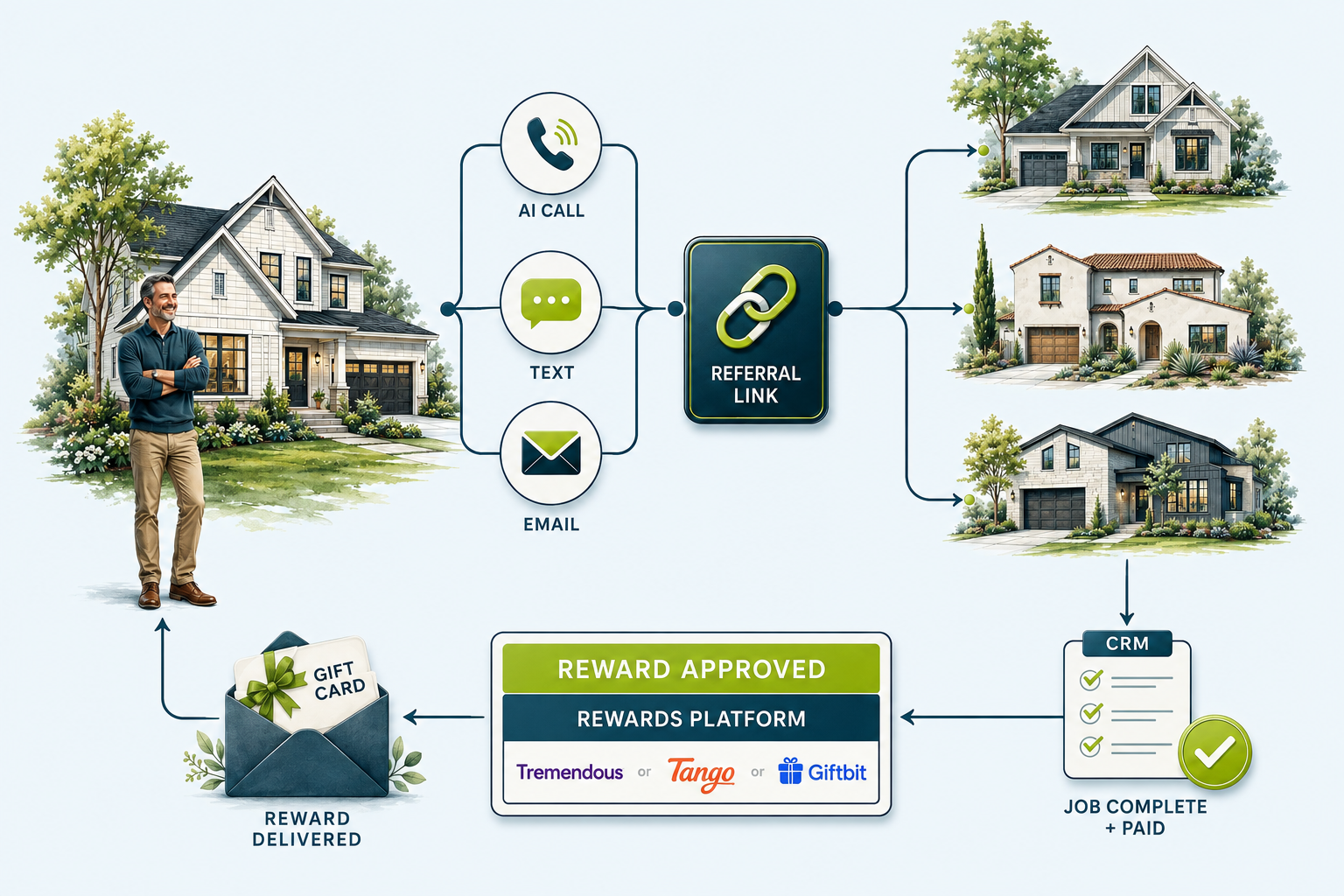
Proposed workflow · Fictional names, conversations and results throughout · No live messages or paymentsTHE OPPORTUNITY
Give a happy customer an easy next step.
At the final walkthrough, a homeowner says, “My neighbor needs a roof too.” The crew thanks them and moves to the next job. The office may never hear about the conversation. If the neighbor eventually calls, someone has to remember who introduced them, and whether a reward was promised.
A contractor referral system closes those gaps. It asks at the right moment, gives the customer something easy to share, assigns the new inquiry and carries the introduction through to the reward. Your office can answer three questions without piecing together messages: who referred this homeowner, who is following up, and what do we owe?
Here is how that could work for a roofing contractor. The same structure fits HVAC, plumbing, electrical, remodeling, cleaning and lawn care. Only the moment and the reward terms change: a remodeling customer is ready to be asked after the final walkthrough, an HVAC customer once the new system has run through its first hot or cold week, and a recurring cleaning or lawn care customer after a few visits have gone well.
FOLLOW ONE INTRODUCTION
Jordan’s finished roof. Casey’s new inquiry. One earned reward.
An illustrative journey from closeout to reward delivery. These are invented people and events that demonstrate the proposed system. It is an illustrative example, not a real customer’s project.
The crew finishes Jordan’s roof.
The job is paid, closeout is complete and no service issue is open. Jordan’s record enters the referral program under the agreed channel rules.
Jordan asks for the link.
In this consented AI-call example, Jordan requests the link by text and the terms by email. Both deliveries are logged. Jordan replies that they will share it; invitation reminders stop.
Casey reaches out.
Jordan’s neighbor submits their own inquiry using the link. Maya in the office receives the lead with Jordan attached as the referrer and books an inspection.
The referred job qualifies.
After Casey’s roof is completed and the invoice is paid, Jordan’s sample $150 reward becomes eligible. The signed estimate alone did not trigger payment.
The promise is fulfilled.
Taylor approves the reward. The rewards platform issues it and confirms email delivery to Jordan. The record shows “Delivered”; redemption remains unknown until supported evidence arrives.
01 / START WITH THE RIGHT MOMENT
Ask after the job is ready to stand behind.
A “job completed” event should start a check, not immediately trigger three messages. Confirm the work is closed out, the customer has no unresolved service issue, and the record meets the contractor’s program rules.
A customer waiting for a punch-list repair needs an owner and a resolution. Hold the referral invitation until that issue is resolved. A repeat event from the job system should update the existing enrollment rather than create a second campaign.
Record the customer ID, completed job, eligible date, program version and permitted channels. A completed purchase does not automatically establish permission for every kind of marketing contact.
02 / ONE INVITATION, THREE WAYS TO DELIVER IT
Let the conversation choose the next channel.
AI calls can explain the program. Text makes the link easy to share. Email gives the customer the details to keep. Each channel reads the same reply and suppression history.
01 · AI PHONE CALL
A short conversation.
“Hi Jordan, I’m the AI assistant for Example Home Services. I’m calling about our customer referral program. Would you like me to text you your personal referral link?”
If the customer asks about an unresolved repair, route it to service and pause the invitation. If they want the link, send it through an approved channel and stop the invitation-call sequence.
02 · TEXT MESSAGE
A link they can share.
“Jordan, here’s the referral link you requested from Example Home Services: [personal link]. Share it with someone who needs our services. Reward eligibility and terms are on the page. Reply STOP to opt out.”
Keep the message identifiable and relevant. A delivered text is not evidence that the customer shared the link or that a referral exists.
03 · EMAIL
The details in writing.
Subject: Your referral link and how it works “Thanks for choosing Example Home Services. Share your link with a friend. If their job meets the program terms, we’ll let you know when your reward is approved.”
Include the shareable link, qualifying services, reward conditions, business contact details and an unsubscribe option. Keep the terms consistent with what the call and text promise.
Illustrative copy, not a production-ready consent script. Sender details, approved terms and channel requirements must be completed for the actual business.
03 / RESPOND TO WHAT HAPPENS
Three channels should never become three competing campaigns.
Choose a preferred eligible channel first. In a sample schedule, a text invitation could go out two days after closeout, followed by one email reminder a week later if the customer has not responded and email is eligible. An AI call could be an alternative for an appropriately consented customer—not an automatic extra attempt for everyone.
A reply changes the plan. “Send me the details” ends the invitation sequence and creates the requested delivery. “I already shared it” ends reminders to share. “Call me next month” creates a dated task. A stop request updates the applicable communication restrictions before another worker can send.
Store the next attempt as a real timestamp in the customer’s time zone, along with its channel and reason. When nothing is scheduled, show why. A blank cell leaves the office guessing whether the customer is finished or forgotten.
04 / THE SHARED CUSTOMER RECORD
Every conversation. The next action. The reward.
Jordan’s record below follows the full story. Select Morgan, Avery or Riley to see a scheduled reminder, a service hold or a reward awaiting approval. Each is a separate fictional scenario, with a visible next action or a reason nothing is scheduled.
Customer referral trackerFictional scenarios at different stages · All times CDT
DEMONSTRATION
Select a customer to view the full communication history
Customer / completed work
Program status
Next action
Reward
DEMO-R101 · Roof replacement
Reward delivered
None — delivery confirmed; reminders stopped
$150 delivered · Redemption unknown
DEMO-R102 · HVAC installation
Reminder scheduled
Sep 18 · 1:00 PM CDT · Email reminder
None · No referral yet
DEMO-R103 · Window installation
Service hold
Sep 12 · 9:00 AM CDT · Human service callback
On hold · No referral yet
DEMO-R104 · Siding replacement
Reward eligible
Sep 19 · 10:00 AM CDT · Reward approval review
Eligible · $150 · Not paid
COMMUNICATION & ACTIVITY HISTORY
Jordan Reed
Casey Brooks · Job complete and paid
Next attempt / task
None — delivery confirmed; reminders stopped
Owner: Taylor / Operations
AI CALL
Connected · Customer requested link by text and terms by email. Invitation calls stopped.
Recording reference: DEMO-CALL-101 · illustrative; no audio file
TEXT
Delivered · Personal referral link and program terms sent.
Provider reference: DEMO-SMS-101
TEXT REPLY
“Thanks, I’ll send this to my neighbor.”
Reply saved · Share reminders stopped
EMAIL
Delivered · Requested program details sent.
Provider reference: DEMO-EMAIL-101
REFERRAL
Casey submitted an inquiry using DEMO-JR7Q.
Matched to Jordan · CRM owner Maya
CRM
Appointment booked for Sep 14, 4:00 PM CDT.
Sales task belongs to Casey’s record; reward remains pending
CRM
Casey’s job completed and invoice paid. Jordan’s $150 reward is eligible.
Evidence: DEMO-JOB-201 / DEMO-INVOICE-201
APPROVAL
Taylor approved Jordan’s $150 referral reward.
Program DEMO-V1 · One reward authorized
REWARDS PLATFORM
Sample provider confirmed issuance and email delivery.
Order DEMO-REWARD-101 · Delivery confirmed; redemption unknown
CRM
Reward delivery saved. No additional invitation or delivery reminder scheduled.
Reward claim link excluded from this shared history
CRM sync: Current in this sample$150 delivered · Redemption unknown
05 / THE INTRODUCTION
Let the new homeowner start the conversation.
Casey opens Jordan’s link and sees a contractor-branded inquiry page: who the business is, what it does, where it works and how to request an inspection. The referred homeowner supplies their own contact information and chooses how to be contacted. A friend sharing a link is not giving consent on someone else’s behalf.
Use an opaque referral code rather than exposing the referring customer’s phone number, email or CRM ID in the URL. Keep the referral association when the new inquiry reaches the CRM. If the homeowner calls instead, the office can capture a referral code or referring customer and send uncertain matches to review.
Check for an existing homeowner or opportunity before creating another. A referral link clicked twice should not produce two rewards. If two customers claim the same introduction, apply the published attribution rule and preserve both claims for review rather than silently overwriting the first record.
The referring customer can receive a limited status update such as “Your referral was received.” They do not need access to the new homeowner’s estimate, recordings, private notes or financial details.
06 / FOLLOW THE JOB, NOT JUST THE LINK
A referral needs the same ownership as a paid lead.
The new inquiry enters the contractor’s normal lead follow-up system with an assigned owner, source marked “customer referral,” and the referring customer attached. Calls, texts, emails and appointments belong to the new homeowner’s record. The original customer’s record retains the introduction and appropriate program updates.
Maya books Casey’s inspection for September 14. That stops the unbooked-lead reminders. Jordan receives only a referral acknowledgment; Casey receives the appointment details. Later, the signed estimate advances the sales stage, while the reward waits for completion and payment.
07 / THE REWARD LEDGER
Promised, eligible, approved and issued are different states.
Define the offer before launching. The sample below uses a $150 reward after an eligible referred job is completed and paid. This is an example policy, not a GoodHandoff offer or a recommended universal amount.
PendingReferral received; qualifying work has not finished.
EligibleJob completion and payment evidence satisfy the program rule.
ApprovedA named reviewer authorizes the reward.
IssuedProvider confirms issuance. Track delivery and redemption separately.
Keep the reward amount and program version that applied when the referral qualified. Later changes to the offer should not silently rewrite earlier promises. Define exclusions, duplicate referrals, cancellations, refunds, service-area limits and any expiry terms before the first invitation.
For Jordan, Casey’s completed job and paid invoice establish eligibility on October 20. Taylor reviews those records the next morning. Approval authorizes the $150 reward; the provider’s response establishes whether it was issued and delivered.
Keep referral rewards separate from review requests. The program is rewarding an eligible introduction, not a positive review. Contractor-specific program and payment requirements should be reviewed before activation.
THE REWARDS PLATFORM / COMPLETE THE HANDOFF
Approve it in the CRM. Deliver it through a rewards platform.
A reward ledger tracks the promise. A rewards platform fulfills it. Connect the two so the team can see which reward was approved, whether it reached the customer, and what still needs attention.
Referred job Complete + paid→CRM review Reward approved→Rewards platform Issue reward→Customer delivery Email or secure link→CRM history Delivery + redemption*
*Record redemption only when the provider exposes that status. An email delivery event does not mean the reward was claimed or spent.
Three rewards platforms worth evaluating for this build
Our first candidate for this example when customers should choose among gift cards, prepaid cards and available monetary payout options.
The approved CRM reward triggers an API order. Save the returned reward reference against the referral and reconcile its delivery state.
Production access, available recipient options, funding method and fees. Monetary payout availability depends on the recipient and program configuration.
A candidate for a branded gift-card program with a curated choice of rewards through Reward Link.
Use its API to place reward orders and send branded email or deliver within the customer experience. Bring order history and email delivery status back to the team.
Catalog, branding, account funding and commercial terms for the planned program. Confirm the reporting fields needed for reconciliation.
A candidate when the contractor wants gift-card or prepaid-card rewards delivered inside its own text, email or customer portal flow.
Use its API and link-based delivery. The workflow places the reward link in the approved customer message and stores the order reference.
Reward and regional availability, claim conditions, funding costs and any product-specific fees. Verify which delivery and claim states the selected integration exposes.
For this example, start by evaluating Tremendous.
Our recommendation is based on its documented range of reward and payout options and API support. A homeowner can receive an approved reward without the contractor building a gift-card catalog or collecting their banking details in the CRM. Confirm the options available to the program’s actual recipients before choosing the offer.
If the business already uses Tango or Giftbit successfully, evaluate that account first. The important fit is the customer’s reward choice, the office’s approval process and the ability to reconcile what happened. Changing providers has little value if the existing one already meets those needs.
Price the delivery method as well as the reward.
Budget the $150 face value of each issued reward before any fees or contractual credits. Funding fees, monetary payout charges or particular card products may add costs. Tremendous documents fees for certain monetary options and credit-card funding; Giftbit also publishes funding and product-specific pricing. Check Tremendous’s fee guidance, Giftbit’s pricing and the terms quoted for the chosen Tango account. Include those costs in the program budget alongside the reward itself.
Keep the invitation link and the reward link separate.
The referral link is designed to be shared with friends. The reward claim link belongs to the customer who earned it and should be handled as sensitive. Send it only through the agreed delivery channel and keep it out of public referral pages, shared spreadsheets and general activity exports.
An AI call can explain that a reward is ready and offer delivery through an approved channel. Email or text can carry the secure claim link. Choose either the provider’s delivery or the custom message flow for each issuance so the customer does not receive duplicate notices.
Show what happens when delivery fails.
After approval, the workflow checks funding and submits one reward order tied to the referral’s unique reward ID. Save the provider’s order reference before marking the issuance complete. If the request times out, look up the existing order before resubmitting. A bounced email creates a correction task; it does not create a second reward.
Use separate fields for approval, issuance, delivery and redemption. A customer who has not claimed a reward is in a different situation from someone whose email bounced. Any reminder should reference the existing reward, follow the provider’s current rules, and stop when the available status shows it has been claimed.
08 / MEASURE THE WHOLE PATH
Count new opportunities. Then count what they earned.
Fictional closed cohort for illustration. These figures are not real customer results or a forecast.
Customers invited100
Customers who referred20
Referred inquiries30
Appointments booked18
Jobs completed & paid6
20% of invited customers referred 20 ÷ 100
60% inquiry-to-appointment rate 18 ÷ 30
20% inquiry-to-paid-job rate 6 ÷ 30
$900 sample reward expense 6 qualifying rewards × $150
Track collected revenue, job margin, reward expense, delivery costs and staff time separately. If this cohort also cost $300 to operate, its direct program cost would be $200 per paid job: ($900 + $300) ÷ 6. That excludes job delivery costs and is not profit.
Use the original invitation cohort and allow time for jobs to close. Comparing this week’s invites with this week’s paid jobs mixes different customers. A referral tag shows attribution; it does not prove every referred job was created by the campaign. Compare against a suitable baseline or a holdout group before claiming incremental growth.
A custom build makes sense when the business needs to coordinate a job system, AI phone provider, SMS and email tools, CRM and payout process that do not share the same status. Use the existing referral identity where possible. Avoid a second independent reward ledger that disagrees with the first.
The connection map should identify which system owns completion, communication permissions, sales stage and payment confirmation. Webhooks can carry changes where supported; scheduled reconciliation catches missed updates. Both paths should recognize the same event so a delayed webhook cannot issue a duplicate reward.
10 / YOUR VERSION OF THIS SYSTEM
What GoodHandoff would connect.
We connect your completed jobs, customer invitations, referral tracking and reward delivery. The scope starts with the tools you already use and the handoffs your office currently manages by hand.
The customer experience
A personal referral link and branded inquiry page, coordinated AI-call, text and email copy, program terms, and appropriate referral and reward updates.
The office workflow
CRM ownership, a full communication history, dated next actions, linked referrer and homeowner records, reward approval and delivery exceptions.
The operating handoff
Documented connections, a pause control, a sample-to-pilot launch plan and reporting from invitations through paid jobs and reward costs.
Bring four things to the first conversation.
Your job-management system, your CRM, the referral offer you want to make, and the person who should approve rewards. If the offer is not decided yet, we can map the qualifying event and approval process before selecting a provider.
Prove one complete journey before expanding.
Start with sample records, including a service hold, a stop request, a duplicate inquiry and a failed reward delivery. Then follow one permitted pilot through invitation, response, inquiry, assignment, qualifying job and reward delivery. The handoff is complete when the team can verify each outcome and knows who handles an exception.
QUESTIONS CONTRACTORS ASK
Decisions to make before the first invitation.
Do we need to replace our CRM?
Start with its existing referral and communication features. A custom connection is useful when completion, follow-up or rewards happen elsewhere and the team needs those records to agree.
Should we pay for an inquiry or a completed job?
That is a program decision. Paying for inquiries rewards introductions sooner but requires a clear definition of a qualified referral. Paying after completion and collection ties the reward to realized work, but customers may wait longer. This example uses the latter and explains that condition upfront.
Does every customer need an AI call?
No. Use the customer’s eligible preferred channel. The AI call in Jordan’s story demonstrates one path; an email-only or text-first program can use the same referral tracking and reward process.
What if the neighbor calls instead of using the link?
Ask how they heard about the business and capture the referring customer or code. Review ambiguous matches and existing opportunities before awarding credit. Keep the original lead source and the referral claim visible.