What should you spend following up on unsold estimates?
Unsold estimates can justify better follow-up. They can also hide expired prices, open scope questions and jobs you no longer want. Here is how to set a budget.
- Lead
- Estimate
- Sold
- Production
- Paid
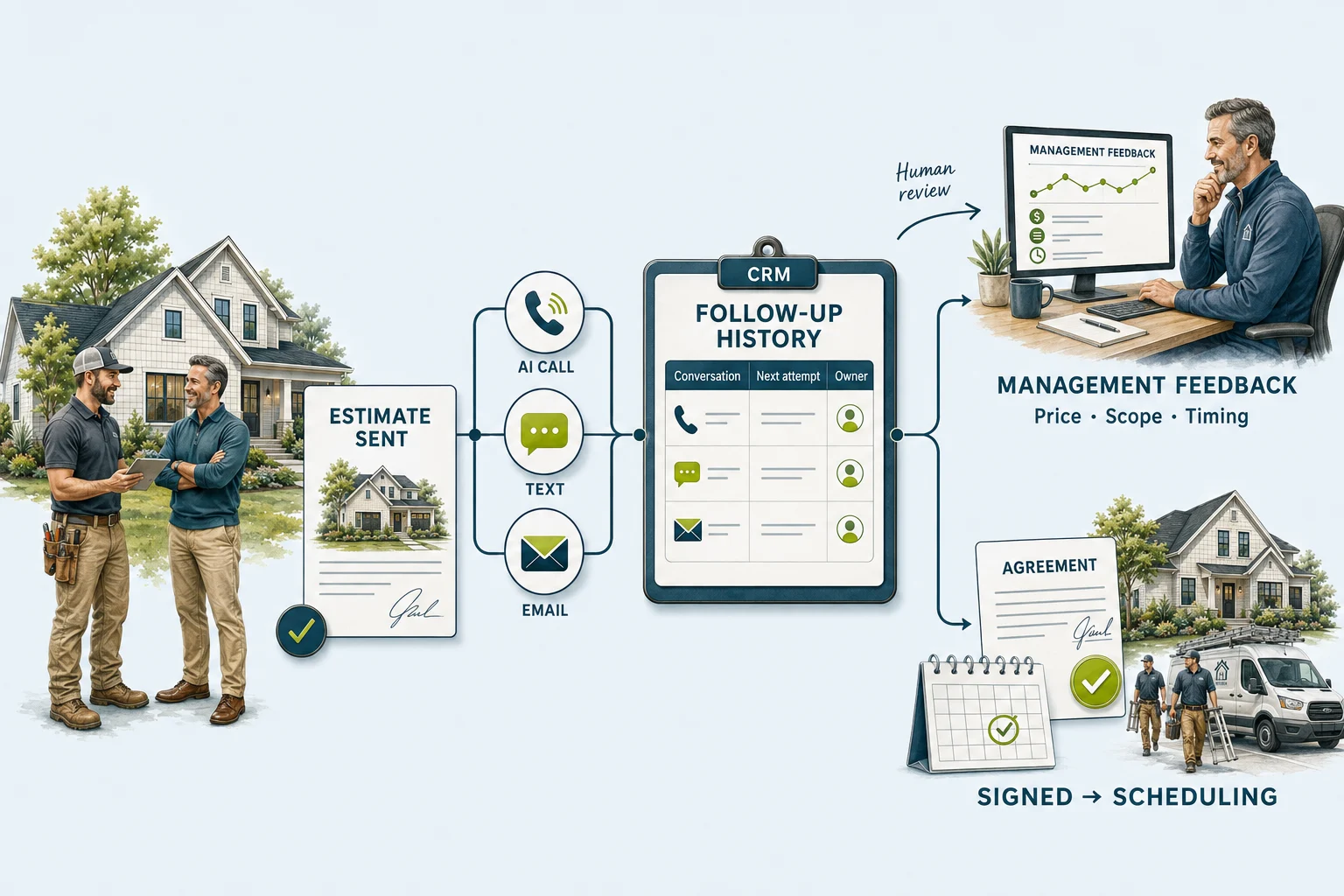
Consider a window estimate that has been sitting open for six weeks. The homeowner liked the product but asked whether the price included repairing the interior trim. The salesperson meant to check. Nobody answered. Now the office is considering a system that will text the homeowner every few days.
That system may get a reply. Someone still has to resolve the trim question, confirm the price and find room on the installation schedule. Those are part of the cost of following up, even if sending the message is almost free.
A sensible budget starts with two things: the opportunities your team can still help with, and the money an additional completed job would leave after doing the work. The monthly software bill comes after that.
Start with the estimates you would still want to win.
Open your recent unsold estimates and read the last conversation. A homeowner comparing two current proposals is in a different position from someone who asked you to call in November. A six-month-old roofing price may need a new inspection or a revised material allowance before it can become a useful offer again.
Separate current decisions, agreed callbacks and work that needs an estimator’s review. Remove accepted jobs, duplicates, people who declined further contact and opportunities your business no longer serves. An old lead count is a poor basis for buying a follow-up plan when much of the list cannot reasonably enter it.
For the window job above, the next step is a scope answer. For an HVAC replacement delayed until next month, it is a dated callback. For an unanswered estimate with no known objection, a brief check-in may be appropriate. The system should help your office make those distinctions before it increases the number of attempts.
If you have only a handful of current estimates each week and a reliable salesperson, a CRM task list may be enough. If hundreds of otherwise suitable estimates disappear between salespeople, the missing review and assignment process deserves a budget. The size of the usable queue matters more than the age of the database.
Three purchases that come with very different bills.
Configuring your existing CRM. You pay for someone’s setup time and any required plan upgrade. The office still owns the conversations. This is a sensible starting point when the problem is remembering who to call and when. Ask the person maintaining the CRM to show one estimate becoming a correctly assigned task before buying another tool.
Buying a follow-up product. A subscription may include messaging, call handling, setup or support. Check the exact outbound use case: a front-desk answering plan is not automatically an unsold-estimate campaign. Your total depends on the included volume, overages, CRM connection and the work the vendor leaves with your staff.
Commissioning a custom workflow. You pay for the initial build, the accounts it uses and the work of running it. This can make sense when a reply needs to stop pending contact across several tools, reach a particular estimator and update the original job. It also creates something your business must maintain when staff, fields or services change.
Get the quote broken into setup, added software, metered usage and optional support. Then add your own time for reviewing old prices, answering questions and checking exceptions. If a discovery fee will be credited toward the build, count the credited amount only once.
What would it take to earn this back?
These starting values are a made-up planning example, not a quote or typical contractor results. Use added costs beyond what you already pay. Include all channels and provider charges in usage.
First-year cost
- Setup
- $3,000.00
- 12 months of software, usage & support
- $2,700.00
- Total added cash spending
- $5,700.00
- Office time valued separately
- $1,680.00
- Cash + office capacity
- $7,380.00
4additional completed jobs to cover cash and office time
Four additional jobs could cover this example. Four existing sales would not.
With the calculator’s starting assumptions, setup is $3,000 and added software plus usage is $225 a month. First-year cash spending is therefore $5,700. Four office hours a month valued at $35 an hour add $1,680 of staff capacity, bringing the comparison to $7,380.
Suppose an additional completed job leaves $2,000 after materials, labor, subcontractors, commissions and other costs that rise with the job. Covering $7,380 requires four additional jobs over the year. That is a break-even requirement from made-up inputs. It does not establish that the available estimates will produce those jobs.
The contribution figure deserves as much attention as the software fee. A $1,000 discount on that same job would reduce its $2,000 contribution to $1,000, assuming the other job costs stay the same. The requirement rises to eight additional jobs. Booking discounted work into an already full schedule can make a follow-up campaign look successful while leaving less money for the business.
Check the cash timing too. You may pay the build fee today and collect the final balance on recovered work months later. A twelve-month break-even calculation does not fund materials or payroll in the meantime.
Finally, count only the improvement. If a homeowner was already arranging a signing appointment with the salesperson, an automated reminder did not create that sale. Compare similar estimates with your usual process, and record cancellations and completed, paid work as well as signed agreements. Small groups can help you spot a broken process; they will not establish a dependable lift percentage.
Budget for the person who answers the reply.
A remodeling customer asking whether the allowance covers a shower valve needs someone who understands the written scope. A roofing customer comparing flashing details needs the estimator. A homeowner ready to move forward needs a real scheduling conversation. The office time in the calculator represents that work, not just looking at a dashboard.
For a first review, track how long the team spends on those replies and whether the promised next step happens. An automation that finds ten interested homeowners on Friday afternoon is useful only if someone has time to get back to them. Match the size of the campaign to the team’s capacity to respond.
The four sample records later in this guide show why a single “followed up” status is inadequate. One customer has a scope question, one has requested a later date, one has not answered and one is moving toward installation. Each needs a different next action. Use the estimate follow-up templates when you need wording for those conversations.
Packaged service prices and call usage answer different questions.
Some published AI-service plans sit at $699–$999 per month. Those are examples of specific packages, not an industry average. Here is how they differ from the $45 calling calculation.
| Example | Published or modeled amount | What the number covers |
|---|---|---|
| Raina Growth ↗ | $699/month | Published voice + SMS package: 700 voice minutes and 3,500 SMS. Listed overages: $0.75/minute and $0.035/SMS. Confirm suitability for outbound estimate follow-up. |
| Raina Pro ↗ | $999/month | Published package: 1,500 voice minutes and 8,000 SMS. These packages also provide a managed front-desk experience. |
| Alivo ↗ | Custom quote | Pricing depends on the agents, lead volume and CRM. Confirm the required channels, included usage, support and billing term in the quote. |
| Illustrative usage example | $45/month in AI calling usage | 100 estimates × 6 total billable minutes × an assumed $0.075/minute. Setup, management, SMS, email, hosting and any separate provider charges are excluded. |
Alivo’s current pricing page asks for a custom quote. Raina’s examples are front-desk packages; confirm outbound estimate-follow-up suitability before comparing them with a custom build. Request the same channels, volume, CRM actions and support responsibilities from each provider.
A package may be the right purchase when the included product, support and integrations fit your process. A custom workflow is worth evaluating when you need different ownership rules, reporting or connections. We are not claiming equal functionality for $45 or calculating a savings percentage from unlike cost categories.
What to learn before expanding the campaign.
Start with a group your office can personally review. Agree on who can enter it, who handles each kind of reply and when contact stops. Keep current estimates separate from older work that requires a new price or scope review. Confirm the contact permissions for the channels you intend to use.
Watch a few records from the first attempt through the office response. Did a reply stop the next reminder? Did the scope question reach the estimator? Did the job record reflect the conversation? When a customer signed, did sales follow-up end? Fix those failures before increasing the volume.
At the end of the review, put actual bills and staff time back into the budget. Compare the outcomes with the way similar estimates were handled before. Continue if the process is reliable and the expected contribution justifies the cost. If the main obstacle is unanswered questions, stale pricing or no installation capacity, put the effort there first.
GoodHandoff offers contractor estimate follow-up builds. Builds run $1,500–$5,000, including AI calls and texts where they fit; a large voice agent is quoted to scope. These are our offer prices, not the assumed $3,000 quote in the calculator or an industry average. A $500 assessment is optional and credited toward the build. Monthly support is optional too: Care at $1,500 a month or Partner at $3,500 a month. The pricing page explains what each includes.
Inspect the usage and the work behind it.
The calling calculator below isolates one cost: 100 estimates at six total billable minutes each and an assumed $0.075 per-minute rate produce $45 in calling usage. The rate is an illustrative assumption, not a quote or a provider-wide price, so check your provider’s current per-minute charges. It also excludes the other costs in the first-year budget.
After the calculator, select a fictional customer to see the conversation history and the office action it creates. The expandable example adds draft messages, a manager’s review and the installation handoff.
What would your call usage cost?
Use total billable minutes per estimate across all follow-up attempts. Six minutes could mean two three-minute calls; actual usage depends on answers, call length and provider billing.
100 estimates × 6 minutes × $0.075
Illustrative per-minute rate.
Excludes setup, management, SMS, email, hosting and any separate provider charges. This is not a complete-system price.
One estimate. Every conversation. A next step.
Select a sample customer. These four independent fictional records demonstrate different outcomes; they are not the 100-estimate reporting cohort below.
| Customer | Status | Owner | Next attempt / task |
|---|---|---|---|
| EST-101 | Price question | Maya / Sales | Sep 11 · 2:00 PM CDT · Human callback |
| EST-102 | Timing | Alex / Sales | Oct 5 · 1:00 PM CDT · Requested check-in |
| EST-103 | No response | Sam / Sales | Sep 14 · 4:00 PM CDT · Eligible text follow-up |
| EST-104 | Installation handoff | Taylor / Scheduling | Sep 15 · 9:00 AM CDT · Confirm installation window |
Casey Brooks
Price question · Maya / Sales
Sep 11 · 2:00 PM CDT · Human callback
- EMAIL
Roof replacement estimate delivered.
Version 2 · $14,800 · Demo amount - AI CALL
Connected · Customer says another quote is lower.
DEMO-CALL-101 · Recording reference only; no audio - TEXT
Customer: “Does yours include replacing the flashing?”
Customer statement preserved · Scope question, not a confirmed lost sale - CRM
Assigned scope review to Maya. Automated sales attempts paused.
Next task Sep 11 at 2:00 PM CDT
Check flashing scope before discussing price. A lower competing quote may cover different work.
Review the underlying conversation before treating a summary as a verified customer reason.Read the worked example: messages, reporting and installation
Ask what is holding up the decision.
For Casey’s roofing estimate, the first useful question is whether the scope makes sense. Casey says another quote is lower, then asks whether flashing is included. That gives the salesperson a specific comparison to clarify. An automatic discount would skip the actual issue.
A timing response belongs on a dated callback task. A financing question goes to the authorized person who can explain available options. No response remains “unknown,” rather than becoming a made-up objection in the dashboard.
Use approved source information for prices, scope and warranty details. The AI should not negotiate a discount, promise financing approval or commit a crew date. Its job is to surface the question, preserve the conversation and get the right person involved.
Useful messages sound like a continuation of the estimate.
Text / scope check
“Hi Casey, this is Example Roofing following up on your roof estimate. Is there anything in the scope you’d like us to explain before you decide? Reply STOP to opt out.”
Email / comparing bids
“Subject: A question about your roof estimate
You mentioned comparing proposals. If it would help, Maya can walk through the flashing, ventilation and cleanup included in ours. What part would you like to compare?”
AI call / human handoff
“I’m the AI assistant for Example Roofing, following up on your estimate. I can note your questions for Maya. Would you like her to call about the scope?”
These are fictional examples for an eligible campaign. Identify the sender and preserve the customer’s contact preferences. For AI telemarketing calls, review the applicable written-consent requirements described in the FCC’s AI-voice ruling; commercial email must follow the FTC’s email requirements. A supplied phone number alone should not enroll every estimate in every channel.
“We followed up” is not enough.
Give management a short list of decisions to make, supported by the original conversation. Separate what customers actually said from the system’s interpretation.
Where the open decisions stand
Three decisions for this week
Scope clarity: review the price/scope group for repeated unanswered questions before changing the offer.
Capacity: check whether timing requests match real installation availability.
Ownership: review overdue human tasks so an answered AI call does not become an unattended handoff.
Track movement, not just attempts.
This sample has 12 signed agreements out of 100 estimates: a 12% signed-estimate rate at the review date. That is not a completed-job rate and does not show a lift caused by automation. Track booked follow-up appointments, signed agreements, cancellations and completed paid jobs separately.
To evaluate improvement, compare cohorts with similar estimate age, job type and lead source, allowing enough time for decisions. Include a baseline or suitable holdout where practical. Review whether follow-up creates additional wins, shortens time to a decision or simply records outcomes the team would have achieved anyway.
When the customer signs, the next owner changes.
Riley asks for the signing link. Once the signed agreement and required deposit are confirmed, the CRM stops estimate-chasing messages and creates an installation handoff. Taylor in scheduling accepts the task. Until that acceptance is recorded, the handoff remains open.
Carry the accepted scope version, product selections, property details, payment milestone and customer availability into the scheduling record. Flag unresolved questions instead of burying them in a call summary.
The customer receives an installation date only after the scheduling team confirms it. The system can help keep that promise visible; it cannot infer crew availability from a successful sale.
Put real numbers behind your follow-up.
Book a free 20-minute call with your average job value and close rate. We will size a follow-up build that pays for itself.